Still staring at an XML sitemap error you can't explain?
- A sitemap that renders as a plain list of URLs isn't necessarily broken — a valid multilingual one looks exactly like that in every browser. Whether Google rejects it comes down to the Content-Type, not the rendering.
- Work the checks in order — first bytes and BOM, Content-Type, status code, XML validity, then the bot's-eye view — and the first one that misbehaves is your answer.
Part of my work consists in auditing other people's websites. And when it comes to their sitemaps, I keep seeing the same scene: the file opens perfectly well in the browser — every URL right there on the page — and yet Search Console swears it's invalid, or that it "couldn't fetch" the thing. That gap between it's clearly on screen and no, the parser won't touch it is what trips people up, because the eye and the crawler are reading two completely different documents.
The one rule I trust: never trust what a sitemap looks like in the browser. A flat list of URLs isn't broken by definition — a plain-text sitemap is meant to look exactly like that, and Google reads it without complaint. A tidy, colour-coded tree isn't proof of health, either. What the browser paints depends on the Content-Type it was handed, on whether a stylesheet loaded, on the browser itself — it's a presentation, not a verdict. It's the least trustworthy witness on the page, which is why not one of the checks below asks you to look at one.

A valid sitemap served as text/html instead of XML — the browser flattens it to a bare list of <loc> URLs, and the Italian hreflang alternates, which live in attributes, don't render at all.
Why what the browser shows proves nothing
A browser decides how to read a document from its Content-Type — but how it displays valid XML is left to the browser, and the results are all over the place. A bare sitemap, nothing but <loc> entries, gets a formatted tree in Chrome and a flat list of the URLs in Firefox. Add hreflang alternates — the <xhtml:link> lines that make a sitemap multilingual — and even Chrome abandons the tree for a flat list; the namespace declaration makes no difference. Serve the file as text/html and it flattens in every browser. Same valid file, and the picture depends on the browser and on what's inside it.
Only that last case is actually broken. Served as text/html, the browser stops treating the bytes as XML at all and parses them as a web page: <urlset>, <url>, <loc> and <xhtml:link> become unknown elements with no rendering rules, so only the text between them survives. The catch is that it lands on the very same flat list a valid multilingual sitemap produces — so the look alone can't tell a broken file from a healthy one.
The hreflang alternates are no help as a tell, either. They'd only ever be legible in a tree view, shown as source — but their presence is exactly what tips the browser out of the tree and into the flat list. A multilingual sitemap therefore shows its alternates in no browser at all, valid or broken; their absence from the screen is the default, not a symptom.
What actually decides whether Google accepts the file is the Content-Type, not the picture on screen. Served as text/html — often because a redirect or rewrite dropped the .xml somewhere along the way — the file is no longer read as XML, and that's the real fault. Step 2 is the check that catches it.
So before touching the file, here's the sequence I run start to finish to find what went wrong. Each step is a curl command aimed at one specific problem. Replace example.com with your domain.
1. Check the first bytes for a BOM or leading junk
The <?xml declaration must be the very first byte of the file. A UTF-8 Byte Order Mark (BOM) or leading whitespace is the most common reason an otherwise-fine sitemap gets rejected.
curl -s https://example.com/sitemap.xml | head -c 64 | xxd
What you want to see: the output starts with 3c3f 786d 6c — that's <?xml in hex.
Bad sign: efbb bf before the <?xml — that's a UTF-8 BOM. Strip it. Anything other than <?xml at byte zero (e.g. 4854 5450 = HTTP) is a sign you're looking at the wrong thing — probably a response dump you saved earlier, not the live file.
Always inspect the live URL, not a copy you downloaded. A bad save can add bytes that aren't really there on the server.
2. Confirm the Content-Type
Google needs the sitemap served as XML. If your server sends text/html, the crawler may try to parse it as a web page and reject it.
curl -sI https://example.com/sitemap.xml | grep -i content-type
What you want to see: content-type: application/xml (or text/xml).
Bad sign: text/html. This usually happens when the sitemap is served through a redirect/rewrite or from a path without a .xml extension. The fix depends on your host — set the Content-Type header for the sitemap path to application/xml; charset=utf-8.
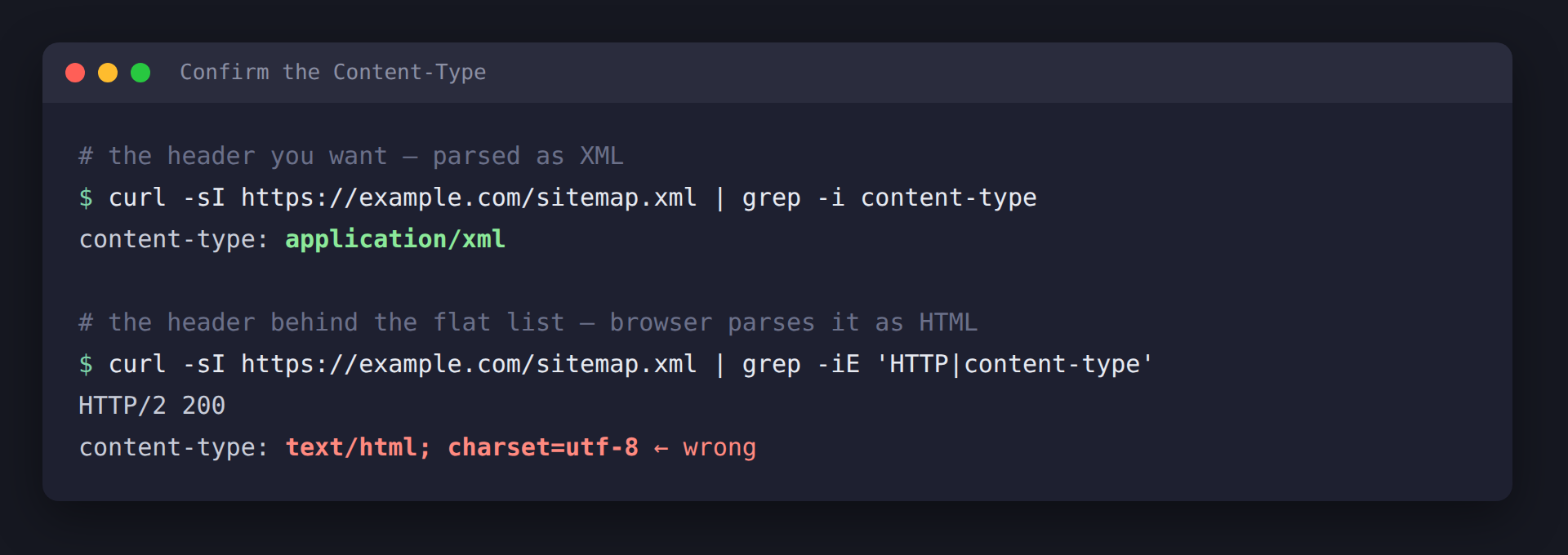
The header that decides everything: application/xml is parsed as XML, text/html is parsed as a web page — and that second one is what flattens the file.
Here's a live one, no local trickery involved: legislation.gov.uk/sitemap.xml. It answers 200 OK with Content-Type: text/html, and what comes back is a perfectly nice HTML page — a human "Sitemap" index with links to browse the collection. Lovely for a person; useless to a crawler that was promised XML and handed a web page instead.
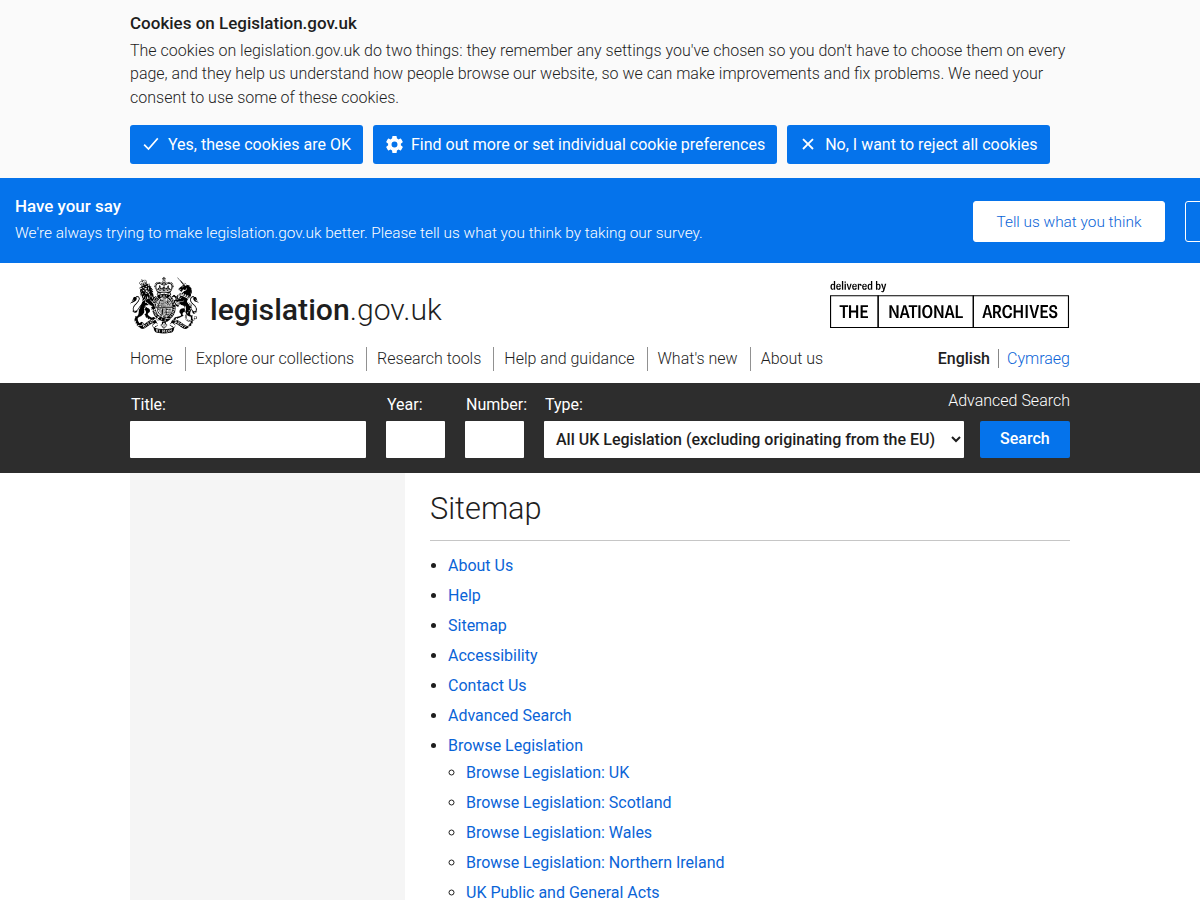
A real, reputable site: legislation.gov.uk/sitemap.xml serves a styled HTML page, not XML. It's the same class of mismatch as the flat list above — text/html where application/xml belongs — just dressed up as a full page rather than a bare wall of URLs.
3. Confirm the URL actually returns 200
A sitemap behind a redirect, a soft 404, or an authentication step will fail regardless of what's inside it.
curl -sI https://example.com/sitemap.xml | head -n 1
What you want to see: HTTP/2 200.
Bad sign: 301/302 (redirect — submit the final URL instead), 404, or 403.
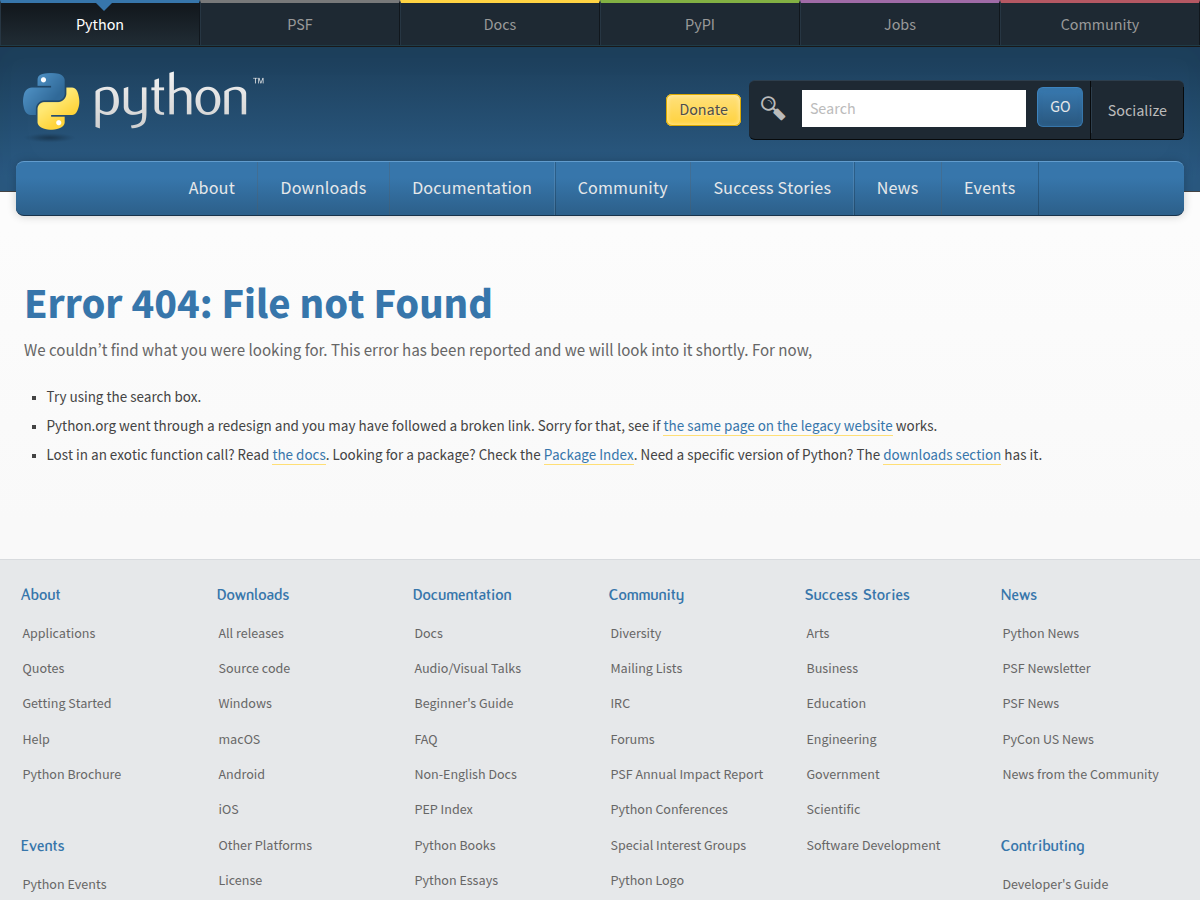
A sitemap.xml that answers with a 404 page still loads in the browser — but with no XML behind it, the file is useless for the job.
4. Validate the whole file as XML
A clean first line doesn't mean the rest is well-formed. Pipe the response into xmllint. The trailing - tells it to read from the pipe instead of a file.
curl -s https://example.com/sitemap.xml | xmllint --noout -
What you want to see: nothing. Silence means valid, well-formed XML.
Bad sign: a line like -:42: parser error : ... pointing you to the exact line and column. The usual offenders:
- An unescaped ampersand —
&must be written&inside a URL. - An unclosed or mismatched tag.
- A broken namespace on
<urlset>.
Want to read it formatted while you're at it? Swap --noout for --format:
curl -s https://example.com/sitemap.xml | xmllint --format -
5. Check what Googlebot sees, not what your browser sees
A fetch from your browser might come back from a CDN cache, or skip an authentication step that shouldn't be there in the first place. Specifying a user-agent — one that emulates a bot, say — can return something completely different.
curl -s -A "Googlebot" https://example.com/sitemap.xml | xmllint --noout -
What you want to see: silence, same as step 4.
Bad sign: an error here when step 4 was clean means your bot path differs from your human path — that's the bug to chase.
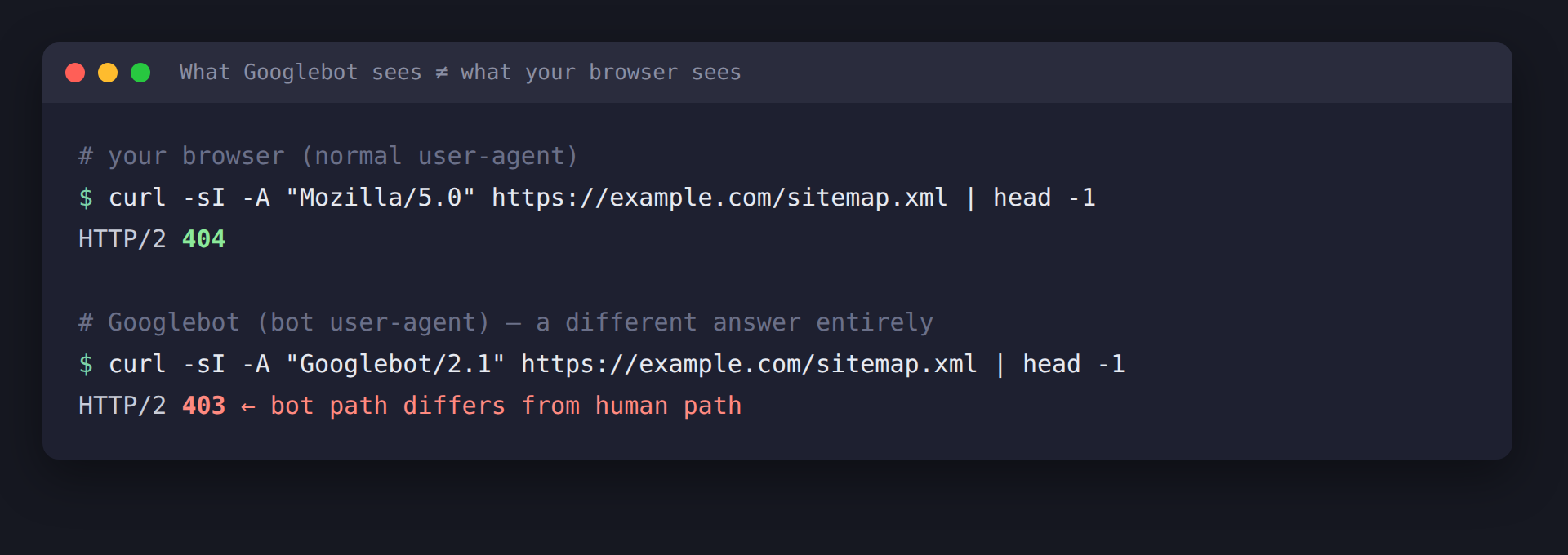
The same URL, two user-agents, two different answers. When the bot path diverges from the human path like this, the sitemap you tested by hand is not the one Google is being served.
6. Make sure every <loc> matches your verified property
GSC flags URLs that don't belong to the exact property — wrong protocol (http vs https), wrong host (www vs bare, or a different domain entirely). This reads as "not valid" but it's a host mismatch, not a structural error.
curl -s https://example.com/sitemap.xml | grep -oP '(?<=<loc>)[^<]+' | sed -E 's#(https?://[^/]+).*#\1#' | sort -u
What you want to see: one line, exactly matching your GSC property (e.g. https://www.example.com).
Bad sign: more than one host, or a host that doesn't match the property you submitted the sitemap under.
7. Check your lastmod dates are valid
A malformed date can invalidate the file, and since Google deprecated the sitemap ping endpoint in 2023, an accurate lastmod is now the main signal that tells Google a sitemap is worth re-crawling.
curl -s https://example.com/sitemap.xml | grep -oP '(?<=<lastmod>)[^<]+' | head
What you want to see: valid W3C / ISO 8601 dates — 2026-06-13 or 2026-06-13T17:37:13+00:00.
Bad sign: anything else — 13/06/2026, June 13 2026, empty tags.
If every check passes
Then the file is genuinely fine, and the "error" is almost certainly a stale state in Search Console — left over from when the sitemap really was broken. The uncomfortable truth: you can't clear that state yourself. Google keeps its own cached view and re-crawls on its own schedule — there's no flush button. All you can do is send signals and wait:
- Remove and re-add the sitemap in the Sitemaps report — the strongest nudge, but still a nudge, and the fresh read can take days to land.
- Keep your
lastmodhonest. With the ping endpoint gone since 2023, it's the one standing signal that the file is worth re-crawling. - URL Inspection → Request indexing on the sitemap URL, to queue a live fetch — more of a hack than a fix.
Last resort — the safe failover. If it simply refuses to shift, stop fighting the poisoned URL and abandon it: rename the sitemap to a filename Google has never seen (sitemap-v2.xml), point robots.txt at the new name, and submit that. A fresh URL carries no error history, so there's nothing stale to wait out — you sidestep the cache entirely instead of waiting for it to expire, and the old sitemap eventually gets removed on its own. It's safe to do: Google indexes the URLs inside the sitemap, not the sitemap's own filename, so renaming the file costs you nothing.
The one-line version
Run these in order; the first one that misbehaves is your culprit:
curl -s   https://example.com/sitemap.xml | head -c 64 | xxd        # BOM / first bytes
curl -sI  https://example.com/sitemap.xml | grep -i content-type    # Content-Type
curl -sI  https://example.com/sitemap.xml | head -n 1               # 200 status
curl -s   https://example.com/sitemap.xml | xmllint --noout -       # XML validity
curl -s -A Googlebot https://example.com/sitemap.xml | xmllint --noout -  # bot's-eye view
If all five pass, stop touching the file — the fault is no longer in your hands.