A hacked web site: how to (quickly) professionally diagnose it
Webmasters should be protective of their own website, regardless of whether it is a little one or a huge site.
After all, all the time spent designing and creating the template, then creating valuable assets for users, cannot really be estimated in monetary terms if this is not a business site with a project, a deadline and a budget already in place.
And guess what? It is horrible to discover that the site where you invested an incredible amount of hours is not even indexed on the search engines because it is seeding malware or serving a cloaked version of your pages.
Hackers can use deceitful techniques to mask their shady attempts to make money using your site. This can take many forms, such as:
- Hidden text (very old fashioned) but still common;
- A cloaked version of your page; you see your site, search engines see something different;
- Embedded code from third-party sites;
- Inclusions of malware or scripts to render unexpected things;
- Redirects to other sites, either random or the same one;
- Actions performed at a specific time of day
So what should you do to diagnose your hacked site?
RULE NUMBER ONE: Do not open your site!
Chances are that a compromised site has been quickly identified as such, and an online service has already classified it, thus making your browser show one of those intimidating warnings that should ring a bell.
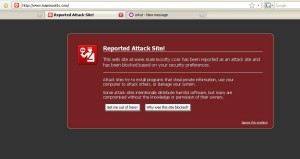
By carrying on and connecting to your site, you will help the malware proliferate across the net, as you suddenly become a healthy carrier.
RULE NUMBER TWO: Investigate with a pool of online tools
There are many sites that can help you discover whether a site has been compromised and what sort of damage it has suffered.
For instance, I do often run parallel checks using both sucuri.net as well as the [Google](/blog/seo-geo/tools-seo-assessment-works/) Safe Browsing service.
Neither of the above requires you to have an account with the service in question.
If those tools don’t reveal anything, you have to move on.
The best alternative is to have a look at your webmaster tools, either Google or Bing. Both of these will normally send you an email if your site is verified and you have configured them to send you relevant emails as soon as circumstances change (so it’s not just about malware and spam).
For instance, the "Fetch the page as Google" feature is useful to see what Google sees when it crawls the page; querying the cache of search engines (assuming you haven’t blocked it at all) may work as well.
RULE NUMBER THREE: Investigate with a pool of offline tools
Perhaps “offline” isn’t the best word in this circumstance, as you still need to be connected to the Internet, unless you have dumped your site to check it with an antivirus (assuming the one you will be using is able to check for specific coding patterns).
So I will limit my “offline” verification to just a couple of tests that can be performed with a command called cURL (natively available on *nix systems, and available to download for Windows).
The first method is to check the headers of your site (or page) by typing the following: cURL -I http://www.mysite.org.
This will let you see the server response and check whether something has changed in your .htaccess file; for instance there could be a hidden redirect.
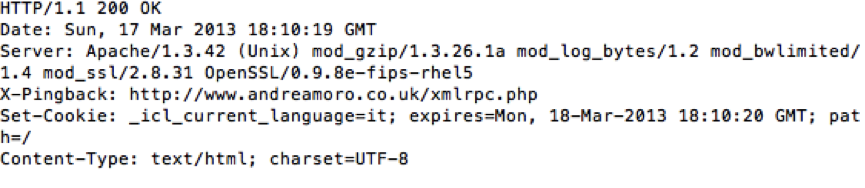 The second test is to dump a specific file to your hard disk, to investigate the source code further. Once again, do not open it in your browser, because it would be almost the same as running the code on your site.
In order to perform this operation, the command to use is cURL -O URL.
where you have to replace URL with the full URI you want to download, ensuring the O is UPPERCASE — unless you want to rename the file, in which case the lowercase version will be fine.
I hope you have found this article useful for your website maintenance, and I look forward to reading your comments.