Enhance Screaming Frog's 404 errors report
- Driving SEO changes is challenging
- Understand how to prioritise the 404 errors fix
- SEO and Data Science are an effective blend
Many clients understand that SEO is a marathon, not a race. Others expect faster results.
No matter what, SEO is always the one discipline that has the least budget and resources, and SEOers often rely on a one-man-band needing to prove efficacy & demonstrate ROI.
Driving changes, however, can be challenging, especially when there is a risk of breaking things, or when there are conflicting priorities. More often than not, SEOers need to provide a business case for what is required; and this isn't all about monetary value, but also a matter of transversal value.
Aside from questioning whether search engines will care about a particular change, it is always fair to ask a couple of questions:
- How many other projects will positively be impacted by the proposed change?
- What will be the impact of leaving an issue unfixed?
Is fixing 404 errors a priority?
If some URLs on your site return 404s, this fact alone does not hurt your site, and search engines like Google will not penalise you for it.
However, addressing 404s may still be valuable. Whether your errors are due to a misspelt URL or a legitimate page now gone, having a look at the 404 errors may bring to your attention unforeseen circumstances you may want to address differently. For instance, a page that is gone but was replaced with something better can be redirected, instead of being suggested to the engine for removal. All without forgetting about the detrimental user experience.
How can I determine the priority in fixing the 404s?
There's only limited time in the day, which means not everything can get done (especially with a stretched dev team bogged down due to insufficient capacity). The "good" part about your 404s is that you are unlikely to speak with the dev team at all. Instead, you may need to talk with the content team, or whoever is in charge of managing the CMS, which may even be you.
Irrespective of who is going to make changes, before discarding this as a fix, you may still need to understand the size of the "opportunity" by gathering numbers. These can be collected with different tools, from the very basic Google Search Console to an online crawler, down to your favourite desktop app.
In my case, whether you like it or not, I have stuck with Screaming Frog for a while, which I conveniently use for Enterprise SEO audits as well.
Dan and his team have covered a lot in the past regarding 404 identification, which can also be used for link building opportunities. They have even published a video in December 2019.
Screaming Frog is a good tool that has evolved a lot in recent years. Yet, like any other software (or business out there), they have to prioritise their time and feature development. This sometimes (often??) comes with certain limits that have to be addressed differently.
Two of them, IMHO, are:
- the usefulness of the information exported, which lacks a summary, and
- the possibility to easily subset the data
A Python script to complement the Screaming Frog 404 export
Here we are at the core of this article, proposing my solution for 404 error prioritisation.
In recent months, I found myself more and more involved with content production and supporting teams to address broken links and redirects. And before returning to these teams, I need to put together specific insights to let them estimate the size of the work. In a nutshell, I found myself repeating the same actions over and over again: crawling, exporting into Excel, opening the file, intersecting data and producing a small report to get numbers ready to be pasted into an email — making the final report more actionable.
Time is precious, so given the fact I needed the information repeated several times for several markets, after a couple of manual reports I ended up automating things.
The solution proposed is a conversation starter, just the first part of what I did; still something good that I'm confident will find positive consensus among some of my colleagues.
What does the Python script do?
The code — conveniently shared in a Jupyter Notebook — is nothing complicated at all. Yet it was an interesting way to dust off my coding skills, discovering new functionality in the language like the Walrus operator; a nice example of how SEO and Data Science now complement each other.
With the use of Pandas, a Data Science package, after having loaded an Excel spreadsheet, I filter the All inlinks report by 404 and 410 errors and run a few queries to produce plain simple text output. Nothing more, nothing less.
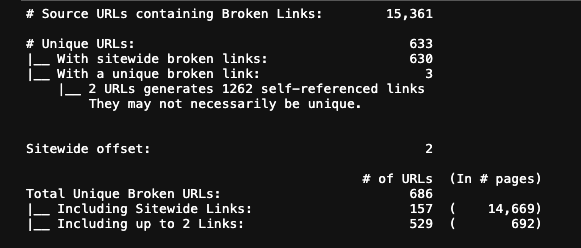
Once I figured out what I felt to be the best approach to segment the data (in relation to my needs), I have also become more productive in extracting information and reporting back to the teams on where to find the broken links, and whether or not some of them could be ignored. Determining the size of sitewide links has become substantially more efficient.
What is next?
My solution is far from being a masterpiece, and I'm sure it has room for improvement. But it felt good sharing the code to allow people to consider this as part of their daily SEO.
Would Dan and his team consider my approach as a suggestion for future implementation? That would be fantastic, but this isn't the main reason everything was put together, though — I appreciate that leading by example often proves to be the most effective way of achieving things.