The 'diff' in SEO: how to use the unix or linux command line tool
When it comes to debugging a website, no matter what the reason might be (e.g. a hacked website or just to check what changes have been made), another useful command offered by *nix is the diff command.
The diff command is typically used to show the changes between one file and its former version. I don’t want to go into details explaining every option this command-line tool offers; rather, I’ll be extremely practical and help you get the most from your comparison process and make it useful for your SEO analysis.
Let’s crack on.
There are a couple of prerequisites for you to move on:
Having the files to compare saved locally somewhere. It doesn't matter where, because, as with any tool, you will be able to specify the path at a later stage. Of course, the shorter, the better, simply because it will save you minutes in typing (unless you use some advanced shell like ZSH with path autocompletion enabled).
You need to be command-line oriented, even when it comes to reading the results.
The Horizontal Diff Layout
Open your OS X Lion terminal, and type in something like this:
#!/bin/bash
diff -i -y -I RE oldversion.html currentversion.html
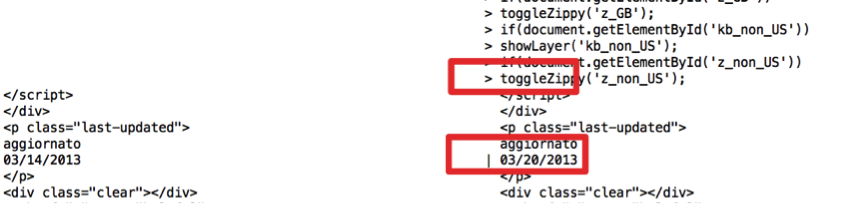
Let’s analyse the parameters:
-i stands for “ignore case”, so something like “I made a change” and “I MADE A CHANGE” would be the same. It’s up to you to decide whether to use it or not. Normally, when comparing HTML files, it’s not really worth enabling it.
-y enables the “Side by Side” view, so instead of getting the original content first and the change afterwards, your screen output will be split into two columns, with the original content on the left and the new content on the right, with a > indicating the additions if any.
Finally, the -I RE stands for “ignore matching lines”; in other words, the output won’t show anything that is the same in both files. A good way to keep the output shorter, especially when the files are quite bulky.
The Vertical Layout (aka the Context Format)
The horizontal layout may not be the one you prefer, or it could be the case that you also need the line numbers. So another quick alternative may be to use the following combination:
#!/bin/bash
diff -i -c cached.txt.html current.txt.html
The context format of diff has been introduced to help while distributing patches for source code that may have been changed minimally.
In the context format, any changed lines are shown alongside unchanged lines before and after.
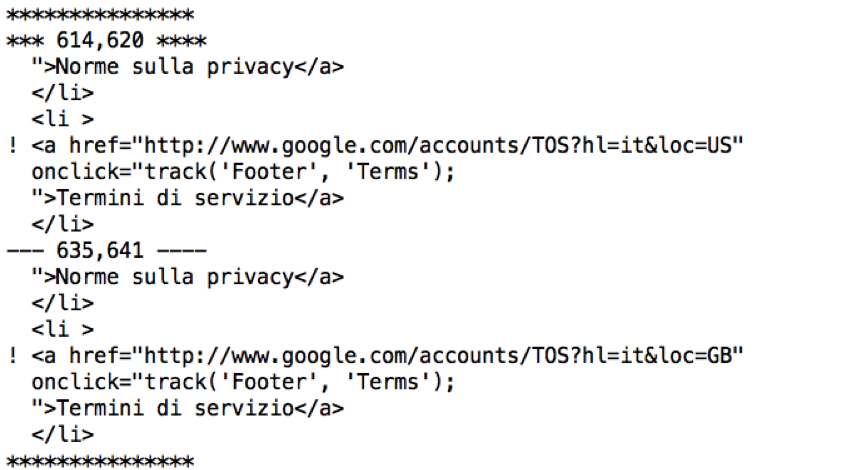
While using the context format, changes are identified differently. A ! (exclamation mark) stands for a change, a + (plus sign) for an addition, and the – (minus sign) for something that has been removed.
If you are interested in the full manual, for the sake of simplicity have a look at this online version. Please bear in mind that different versions of the same *nix-based operating system may have different parameters. Hence, always refer to the command-line version of help that you can access by typing:
#!/bin/bash
diff --help
I hope you have enjoyed this little overview of the diff command.